

Your team has spent weeks sweating the details of a new APEX app. It’s fast, the data isolation is solid, and for once, the stakeholders are actually happy. Then the ‘simple’ request hits your inbox: a twenty-page contract or a branded invoice that has to look exactly like a sample. No compromises. Suddenly, all that development momentum hits a brick wall. Can you even do that in APEX?
Managing reporting tools often feels like an uphill battle because the reporting layer hasn’t kept pace with the application stack. Then there is the struggle with CSS media queries that produce unexpected results every single time, or the tedious task of positioning elements by calculating coordinates like a mapmaker from the past century. While powerful reporting servers exist, they are often expensive and require specialized training that could be better spent on feature development. The bottleneck is clear. The database constantly evolves, but the document creation process falls behind.
This is the perfect chance to rethink document generation. Instead of struggling with low‑level PDF libraries, reports can be designed in the MaxPrint Designer canvas.
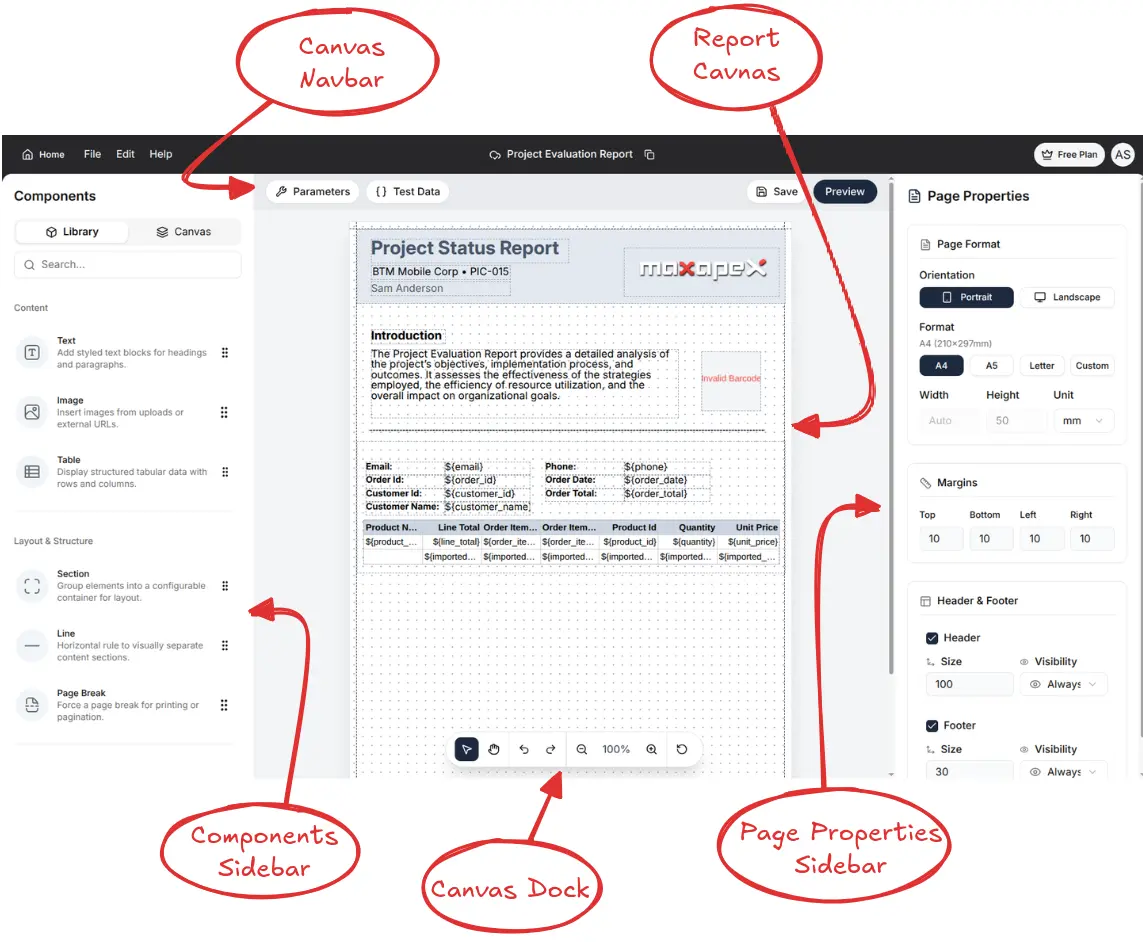
With the MaxPrint APEX plugin, you stay focused on your strengths as an APEX developer: writing SQL and PL/SQL queries to CREATE clean, structured data. MaxPrint takes care of the rest. It binds queries to templates, maps layouts, and produces pixel‑perfect PDFs or other outputs. You avoid the complexity of manual formatting and keep your workflow modern and efficient.
Bridging the Gap: Transforming SQL Logic into Beyond the Bottleneck: Transforming SQL Logic into Professional Document Output
The magic unfolds when the data hits the template. Development stays comfortable where things are already done right—in SQL Workshop or a favorite IDE. Whatever data is considered essential gets defined there. Whether using Simple SQL to extract one record at a time or utilizing an SQL Cursor to generate a complex hierarchical structure, the complexity doesn’t dictate the difficulty. Regardless of the approach, the tool maps SQL aliases directly to the template tags, maintaining the structural relationships defined in the query. The system neatly divides responsibilities.
The database supplies the “what,” while the template supplies the “where.
This separation removes the need for a developer to manage every minor layout change. Visual structures are designed within standard office document editors or the MaxPrint Designer. Instead of coding layouts, data tags like {{customer_name}} or {{invoice_date}} are placed directly into the template. The plugin then binds those tags to the SQL results, automatically handling the rendering to produce pixel‑perfect PDFs.
As soon as the APEX plugin is invoked, MaxPrint maps the SQL and PL/SQL query results onto the defined placeholders in the template. Even advanced layouts—such as Group Above reports—become straightforward because the grouping logic is preserved at the query level rather than being embedded in the layout. This keeps the design layer clean while ensuring that complex data structures remain handled within the database query.
The Power of the Cursor: Handling Complex Data without the Code Bloat
In an ideal world, every report would be a flat table, with each record neatly corresponding to one line in the output file. In practice, however, business requirements rarely allow for such simplicity.
You often need to generate invoices, project reports, or audit documents that include a header with information shared across multiple subordinate records. Traditionally, this required complicated solutions involving nested loops, temporary tables, and string manipulations to produce the desired output
From Query to Document: The Developer’s Workflow
The real strength of MaxPrint shows up when you actually use it. Unlike older reporting systems, you don’t have to wait for middle‑tier servers to restart or batch jobs to finish before a document is ready. That whole layer of delay is gone.
With the Oracle APEX plugin, documents are generated instantly from your queries and templates. You can test, adjust, and re‑run in rapid cycles, keeping your development flow uninterrupted. It’s fast, flexible, and designed to keep projects moving without unnecessary pauses.
The workflow begins with preparing a template, but you’re no longer limited to external editors. With the MaxPrint Designer, you can build layouts directly inside the plugin. The Designer provides a drag‑and‑drop interface, a page properties sidebar for margins and orientation, and a components library for text, images, charts, barcodes, and tables. It also includes a live preview mode, so you can see exactly how your report will render before connecting it to data. This makes it possible to design complex, branded documents entirely within APEX, without relying on external editing tools.
Whatever formatting you define, including things like margins, fonts, headers, or styles, will be preserved in the final output. MaxPrint ensures that what you see in the editor or Designer is exactly what will be printed.
Once the template is ready, you connect it to your SQL or PL/SQL query. The plugin maps query results to placeholders, supports advanced layouts like Group Above reports, and lets you trigger generation from a button, page load, or background job. If something isn’t right, the built‑in debugger shows the raw data being sent to the engine, turning document generation from a “black box” into a transparent, manageable part of your APEX workflow
The Technical Core: Feeding the Engine
One of MaxPrint’s biggest strengths is that it doesn’t lock you into a single way of feeding data. Applications often have very different reporting needs, and the plugin recognizes that by offering three distinct approaches for supplying information to the engine. Whether you’re generating a simple contact list or a complex financial audit report, MaxPrint adapts to the structure of your data rather than forcing you to reshape it
The Three Paths of Data
Simple SQL for Flat Report
If your report only needs a straightforward listing—like a telephone directory or simple log entries—then Simple SQL is the most direct option. You don’t need complex engineering here: define your table structures (you can even use Quick SQL to draft them rapidly), and supply a basic SELECT statement.

SELECT
customer_name AS "customer_name",
customer_email AS "customer_email",
order_datetime AS "order_date",
order_total AS "total_amount",
order_status AS "status"
FROM apex_sample_orders
WHERE order_id = :P10_ORDER_ID;
The plugin takes care of mapping the query results to your template placeholders automatically. This means the layout remains entirely in your template, while the data binding is handled at the SQL level. For simple reports, the approach keeps things clean, and easy to maintain. Honestly, it couldn’t be easier.
The Power of CURSOR() for Nested Data:
Not all data is flat, and MaxPrint makes handling hierarchies straightforward. For invoices with line items or project documents with sub‑tasks, the CURSOR() expression represents parent–child relationships directly in SQL. Instead of writing complex joins that repeat header information across every row, child records are nested inside their parent. In this way, the document structure mirrors the hierarchy in the database.
SELECT
c.cust_first_name || ' ' || c.cust_last_name AS "customer_name",
c.cust_email AS "customer_email",
CURSOR(
SELECT
o.order_id AS "order_id",
o.order_timestamp AS "order_date",
o.order_total AS "order_total",
CURSOR(
SELECT
p.product_name AS "item_name",
i.quantity AS "quantity",
i.unit_price AS "price",
(i.quantity * i.unit_price) AS "line_total"
FROM demo_order_items i
JOIN demo_product_info p ON i.product_id = p.product_id
WHERE i.order_id = o.order_id
) AS "items"
FROM demo_orders o
WHERE o.customer_id = c.customer_id
) AS "orders"
FROM demo_customers c
WHERE c.customer_id = :P10_CUSTOMER_ID;
By using SQL cursor expressions, ‘join explosion’ and redundant header repetition are avoided. The query itself declares the hierarchy—defining the customer and all associated orders. MaxPrint then maps that nested structure into the template so the output reflects the same logical grouping. This approach leverages Oracle’s built‑in capabilities and remains understandable to anyone with basic SQL knowledge, simplifying the workflow for APEX developers.
JSON Objects for Maximum Complexity:
For the most complex reporting scenarios, MaxPrint supports native JSON input. If data can be expressed as JSON objects, the engine interprets it directly—meaning the workflow isn’t limited to SQL alone. This approach allows for combining multiple data sources into a single structured payload, generating a unified document without the need for procedural code.
SELECT json_arrayagg(
json_object(
'customer_id' VALUE c.customer_id,
'customer_name' VALUE c.cust_first_name || ' ' || c.cust_last_name,
'email' VALUE c.cust_email,
'phone' VALUE c.phone_number1,
'address' VALUE c.cust_street_address1 || ', ' || c.cust_city,
'order_id' VALUE o.order_id,
'order_date' VALUE o.order_timestamp,
'order_total' VALUE o.order_total,
'items' VALUE (
SELECT json_arrayagg(
json_object(
'order_item_id' VALUE oi.order_item_id,
'product_id' VALUE p.product_id,
'product_name' VALUE p.product_name,
'unit_price' VALUE oi.unit_price,
'quantity' VALUE oi.quantity,
'line_total' VALUE (oi.unit_price * oi.quantity)
)
ORDER BY oi.order_item_id
RETURNING CLOB
)
FROM demo_order_items oi
JOIN demo_product_info p
ON oi.product_id = p.product_id
WHERE oi.order_id = o.order_id
)
RETURNING CLOB
)
RETURNING CLOB
) AS customer_invoices
FROM demo_customers c
JOIN demo_orders o
ON c.customer_id = o.customer_id
WHERE EXISTS (SELECT 1
FROM demo_order_items oi
WHERE oi.order_id = o.order_id);
From a structural perspective, JSON is especially powerful for Group Above reports—a format traditionally difficult to implement in APEX. By defining grouping logic directly in the JSON (or in the SQL producing it), the need for the engine to perform row‑by‑row change detection is eliminated. The template simply follows the defined hierarchy, repeating headers and nesting child data exactly where intended. The result is a pixel‑perfect, multi‑page document reflecting complex relationships like customers with orders, or projects with tasks, without requiring manual joins or procedural workarounds.
A JSON API is also part of the plugin. The REST JSON API in MaxPrint is designed as a lightweight integration layer that exposes endpoints for structured document generation. At its core, it accepts HTTP POST requests with JSON payloads, where each key–value pair maps directly to dynamic fields within a MaxPrint template. This means developers can push hierarchical data — arrays, nested objects, or scalar values — without flattening or re‑encoding them into SQL. The API automatically binds incoming JSON to the plugin’s rendering engine, ensuring that variables are resolved at runtime and merged into the output stream. Authentication is handled via standard token headers, while responses are returned in JSON, typically including status codes, error messages, and document identifiers for downstream processing. In practice, you can send a payload like { “customer”: { “name”: “Alice”, “orders”: […] } } and have it populate a multi‑section report without additional PL/SQL orchestration. This makes the API particularly effective for microservices or external systems that need to generate reports, invoices, or compliance documents on demand, with minimal overhead and maximum flexibility.
V. Advanced Moves (Tips from the Docs)
Beyond the basics, MaxPrint includes a set of advanced features that make reports smarter and more adaptable. These options let you fine‑tune how your documents behave, ensuring they respond to data conditions, integrate dynamic content, and handle complex layouts with ease.
- Conditional Printing: MaxPrint lets you control visibility of template sections based on data values. For example, you can configure a row to appear only if discount_amount > 0.
${imported_data.salary > 10}
This avoids clutter in your reports and ensures that optional fields—like discounts, notes, or secondary addresses—only show up when they’re relevant. The condition is evaluated at runtime, so the template adapts dynamically to each dataset.
- Dynamic Images: You can bind image placeholders to database columns or REST endpoints. This is useful for logos, product photos, or signatures that vary per record.
- Barcode Integration: The Designer supports barcode elements that can be linked to query values. Perfect for invoices, shipping labels, or event tickets.
- Group Above Reports: Using JSON or CURSOR expressions, you can define grouping logic directly in your query. This eliminates the need for the engine to guess where headers should repeat, ensuring pixel‑perfect multi‑page documents.
Debugging Made Transparent
The MaxPrint plugin comes with an integrated debugger, which allows users to troubleshoot problems easily. Instead of thinking of document generation as a black box, it generates a JSON file detailing the data passed into the engine during generation. The only thing that needs to be done is changing the output format of the plugin to debug, and the user will then get the JSON file containing raw query results and mapped parameters, allowing users to understand why a certain value isn’t there or why a report didn’t succeed.
The ability to view all data being passed through in a clearly understandable format helps developers significantly. The problems related to templates such as unescaped closing tags and broken XML can be easily pinpointed and fixed. As the debugger outputs the data in a clearly readable format, there won’t be any trouble in debugging anything, as all changes will be made by editing SQL, JSON files, or templates. If a team approach is needed, all data is accessible by other people and problems can be reproduced quickly.
Deployment Options: On‑Prem vs. Cloud
With MaxPrint, you are not tied into any solution. You are free to decide whether to use it in the cloud or on-premise depending on the amount of control you would like to have over reporting and infrastructure management. The first approach – deploying MaxPrint on the cloud – is very convenient and easy: the plug-in connects to the MaxPrint services, and you have everything ready and working in a matter of minutes. This option will be ideal for teams that care about speed and maintenance.
On the other hand, if security, tighter control over processes, and compliance with internal policies matter more than anything else, on-premise deployment might be the best solution. With it, the MaxPrint engine works right inside the organization’s infrastructure. Data does not leave its walls and stays safe while being processed. You have access to the whole toolset (Designer, SQL, CURSOR, JSON).
The workflow remains unchanged regardless of the choice you make.
Closing the Gap: Reports Without Compromise
MaxPrint doesn’t just make reporting easier. It changes the experience entirely. What used to be a constant headache becomes a natural extension of your APEX workflow. No more waiting on clunky processes or fighting with rigid tools; instead, you move seamlessly from query to document. Templates remain familiar, data binding stays powerful, and whether you’re working with Simple SQL, CURSOR expressions, or JSON objects, the result is the same: pixel‑perfect output delivered at speed, without compromise.
The true power, however, comes from balance. Programmers remain fixated on SQL and PL/SQL, whereas designers work with templates in the built-in Designer. In the background, the plugin does all the hard work. The process of debugging is completely transparent. Deployment works in either cloud or on-premises environments. And elaborate reports get produced professionally.
MaxPrint bridges the gap between raw data and quality documentation. It can be used by your entire crew without hassle. Regardless of whether it’s contracts, bills, audit records, or something else, they will always turn out beautifully. It operates seamlessly, putting no extra burden on the user.auditing reports, or anything else, they will always come out looking perfect. The system works smoothly, without any unnecessary strain for the users.